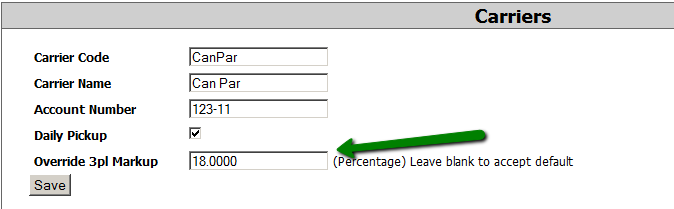
This option allows you to assign different shipping charge markups based on the selected carrier. This feature ensures flexible pricing adjustments depending on the logistics provider used for shipping.
Managing Shipping Charge Markups:
To configure shipping charge markups by carrier, follow these steps:
-
Navigate to Advanced > Administration > Carriers in the system.
-
Select an existing carrier to edit or click to add a new carrier.
-
Locate the Shipping Charge Markup option.
-
Enter the desired markup percentage or fixed amount based on your pricing strategy.
-
Save your changes to apply the new markup settings.
Visibility and Access:
-
This option is available when adding or editing a carrier.
-
Ensure that you have the necessary administrative privileges to make changes to carrier settings.